I redesigned Autoenhance's feedback experience into an image-first review workflow that helps users identify issues, provide contextual feedback, and review multiple images with less friction.
The problem
The current feedback form is a single-image modal with 17 flat checkboxes and one text field. It can't show where on an image a problem occurs, and mixes quality issues (exposure, sharpness) with feature preferences (sky replacement, fire in fireplace) into one undifferentiated list.

The redesign
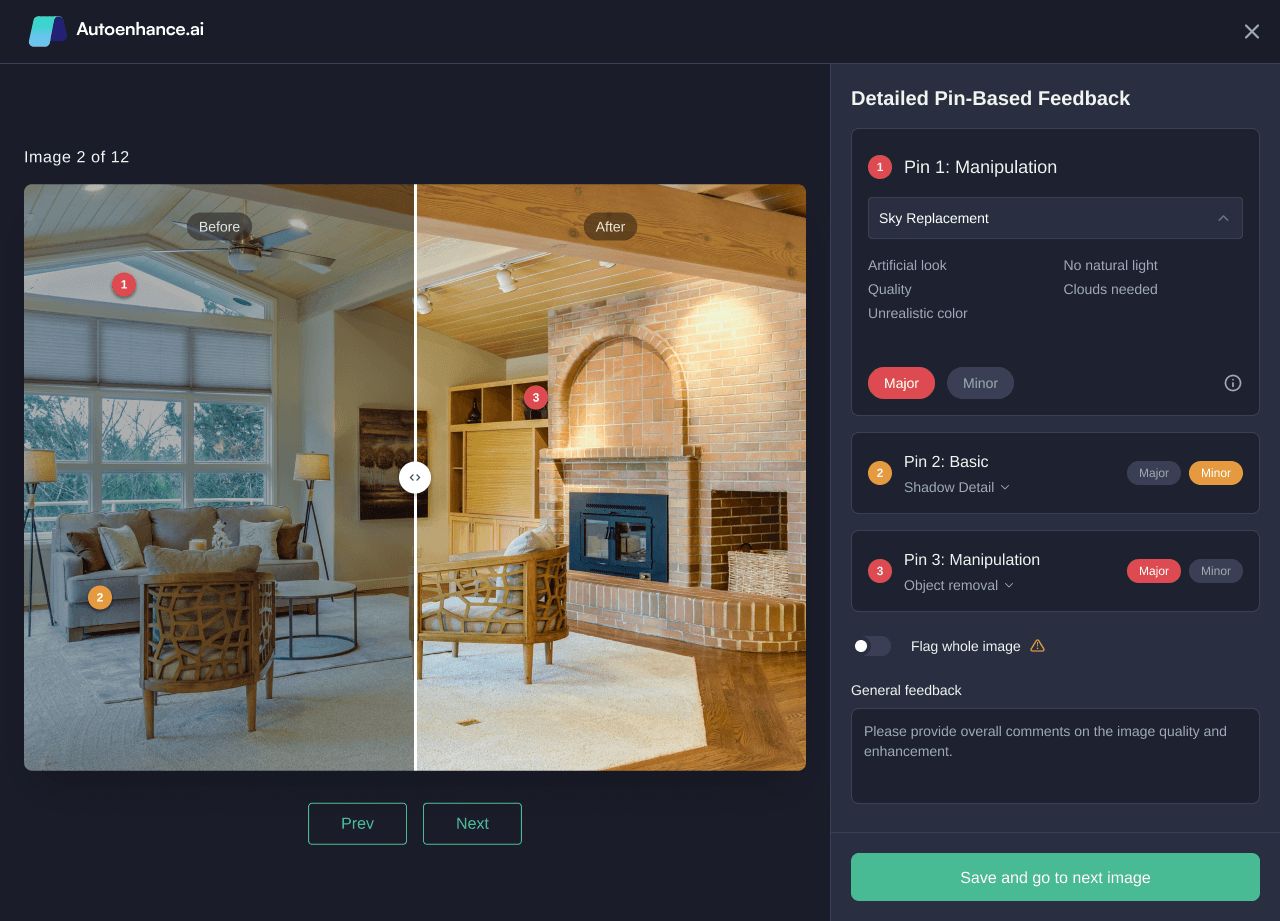
- Pin-based annotation. Users click directly on the problem area to drop a numbered pin, turning vague global feedback into localized, actionable data.
- Severity per pin. Major/Minor toggle lets issues be triaged instead of weighted equally.
- Two-tier categories, each pin shows a group label (e.g. "Manipulation") with a specific item underneath (e.g. "Sky Replacement"), preserving the distinction between "you did this wrong" and "I didn't want this at all."
- Inline batch navigation. An "Image X of 12" counter with Prev/Next sits above the image, letting users move through a full shoot without leaving the review screen. This alone satisfies the brief's "feedback across images" requirement.
- Jargon tooltips, an info icon next to technical terms (e.g. "Window pull") supports the actual users, who are real estate agents, not photographers.
- Fallback options, a "flag whole image" toggle and general comment box remain for quick, non-localized feedback.
Implementation notes
Each pin submits as its own object rather than a flat list of checkboxes:
{ image_id, pin_id, x%, y%, category_group, category_item, severity, comment }
x% and y% place the pin as a percentage of the image's width and height, so it stays correctly positioned regardless of what size the image renders at, whether is a thumbnail, review panel, or full screen.
Batch submission summary
While the core redesign is the single feedback screen, I also included a lightweight batch summary screen for the final submission step. After a user finishes navigating through all images, this screen shows a quick summary with how many were flagged versus marked clean, with thumbnails of only the flagged images, before the user commits with "Submit all feedback."

This isn't a replacement for the inline batch navigation on the main review screen, which already handles the "feedback across images" requirement, it's a lightweight confirmation step before submission, giving the user a final sanity check on what they're about to send, rather than submitting blind after the last image.